Finding Quest Step and Item Icons!
Posted: Sun Jan 18, 2009 3:09 pm
In Everquest2, most quest steps have icons next to them to make them look pretty and such. An example of that is:
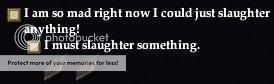
I was trying to figure out how to find these icons for the steps, and it's actually quite easy.
Go to your <directory>\EverQuest II\UI\Default\images\icons folder. In there you will see a bunch of .dds files. The ones we need are the files that are icon_is*.dds where * is a number. I am assuming "is" stands for items or something. If you open up one those files, you'll notice 36 icons in each file. So how do you know which icon is what number?
I'll show you with an example. Here we have icons_is17.dds open:
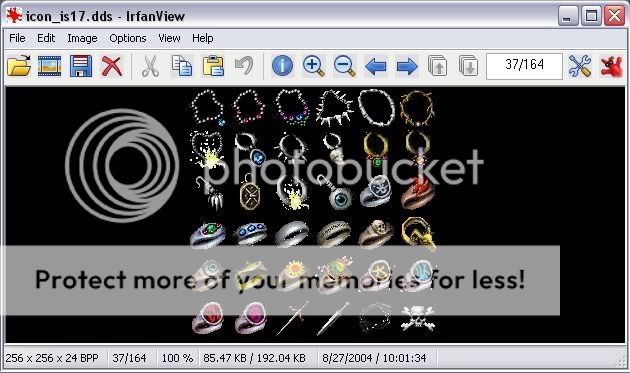
Say we want the skull and cross bones icon.
So the number of the file = 17.
Skull and crossbones is icon 36 in THIS file.
The formula is: ((number of file - 1) * 36) + (icon # you want in file - 1) = icon #
For this example the formula is: ((17 - 1) * 36) + (36 - 1) = 611.
Add that 611 to your QuestStep LUA function parameter in the right place and you'll get your skull and crossbones icon to display (or any # icon you want).
This will also work for finding item icons for the inventory as they both use the same icon files.
I was trying to figure out how to find these icons for the steps, and it's actually quite easy.
Go to your <directory>\EverQuest II\UI\Default\images\icons folder. In there you will see a bunch of .dds files. The ones we need are the files that are icon_is*.dds where * is a number. I am assuming "is" stands for items or something. If you open up one those files, you'll notice 36 icons in each file. So how do you know which icon is what number?
I'll show you with an example. Here we have icons_is17.dds open:
Say we want the skull and cross bones icon.
So the number of the file = 17.
Skull and crossbones is icon 36 in THIS file.
The formula is: ((number of file - 1) * 36) + (icon # you want in file - 1) = icon #
For this example the formula is: ((17 - 1) * 36) + (36 - 1) = 611.
Add that 611 to your QuestStep LUA function parameter in the right place and you'll get your skull and crossbones icon to display (or any # icon you want).
This will also work for finding item icons for the inventory as they both use the same icon files.

 Thanks!