Page 1 of 1
EQ2PacketCollector
Posted: Tue Jun 30, 2009 5:36 pm
by Sylva1n
In french, we have a saying that goes like this:
"A picture is worth a thousand words" ...

Any ideas?
Re: EQ2PacketCollector
Posted: Tue Jun 30, 2009 5:42 pm
by unknwon
i see that your using Vista, did you launch the command line as Administrator?
Re: EQ2PacketCollector
Posted: Tue Jun 30, 2009 5:53 pm
by Sylva1n
hmmm no, how do I do that?
you mean run the command prompt as administrator?
Re: EQ2PacketCollector
Posted: Tue Jun 30, 2009 5:55 pm
by Sylva1n
Ok, ran the prompt as admin, seems to work, I'll test on live now.
Re: EQ2PacketCollector
Posted: Tue Jun 30, 2009 8:48 pm
by Wdneq2
OK finally got this to work on Windows 7
Run
cmd prompt as an
Admin (
do this each time, trying to get it to permanently do it, did nothing)
Put file
zlib1.dll into Windows/system folder (on mine path was Computer>Win7(C:)>Windows>
System
Run
EQ2PacketCollector.exe as an
Admin (
again..do this each time, trying to get it to permanently do it, did nothing )
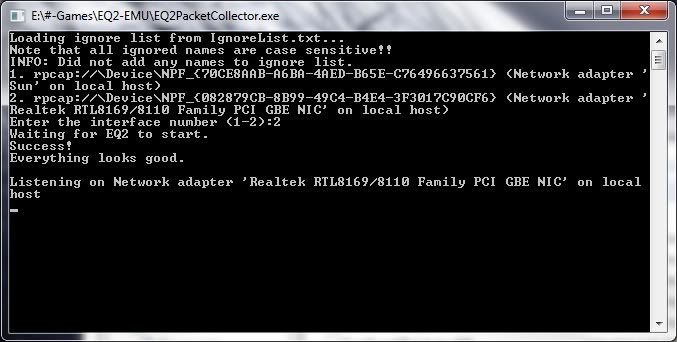
Now this is where I'm at...I presume I'm looking for this file ?? EQ2PacketLog.log ??
After a quick run around Darklight Wood and knocking off a heap of werewolves and a couple of quests its about 16mb.
Re: EQ2PacketCollector
Posted: Tue Jun 30, 2009 11:13 pm
by Zcoretri
The program creates the the EQ2PacketLog.log file in the directory where you run the exe.
Somewhere around here on the forum John posted what you should change the filename to before you upload it. Also you should zip it up before you upload it.
Re: EQ2PacketCollector
Posted: Wed Jul 01, 2009 7:07 am
by John Adams
You also should not have to put files into the %PATH% of your system if you are opening a CMD shell, CD \[to your collector] and running it at a command line. If you are double-clicking EQ2PacketCollector.exe from Windows Explorer, you are doing it wrong.
Re: EQ2PacketCollector
Posted: Thu Jul 02, 2009 6:41 am
by Wdneq2
John Adams wrote:You also should not have to put files into the %PATH% of your system if you are opening a CMD shell, CD \[to your collector] and running it at a command line. If you are double-clicking EQ2PacketCollector.exe from Windows Explorer, you are doing it wrong.
Tried it this way (using assistance from messages) and everytime No dice..seems as though the cmd prompt on win 7 is screwy compared to older windows, i tried a virtual xp on my machine but i couldnt get enough resources allocated to it to run eq2.
Was going to try and install xp as a 3rd system, as im running win7 and vista(for when win 7 either stops or crashes out of existence), but got sidetracked with kids & study, so i thought ill just keep trying to get it to work.
When you say " you are doing it wrong" im not being rude at all ( im still learning), but if its creating the log file isnt that what we need ??
Re: EQ2PacketCollector
Posted: Thu Jul 02, 2009 7:36 am
by John Adams
I just mean, you shouldn't have to go through all those steps to make it work. It is simply opening a command prompt, going to the dir the collector lives in, and running the exe.
You are right though, if it is creating EQ2PacketLog.log, it is working. Just the way you are describing seems a lot more complex than needed. Perhaps that is Win7. I am loading a machine with Win7 this weekend for work, so if I have time I will check this Win7 mystery out.
Re: EQ2PacketCollector
Posted: Fri Jul 03, 2009 8:02 am
by Faraden
Im on windows 7 works fine for me